The Experiment
Rizqi Fahma / 12.08.2023
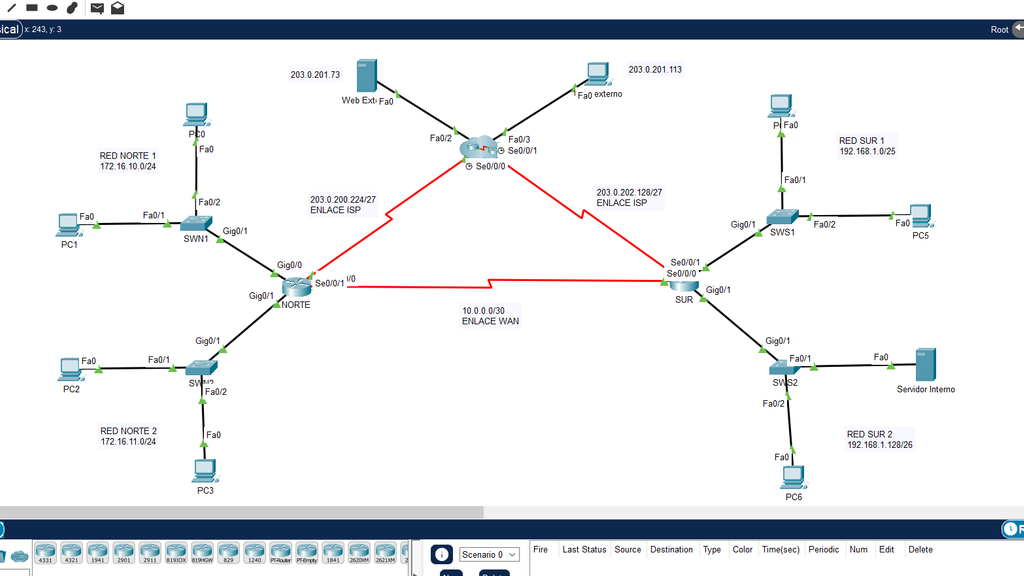
Table of Contents
Information
Configure secure LAN and WAN access through access lists and dynamic address translation for communication with the ISP and local network.
- The device users and passwords are: admin / 1234
- The users and passwords to access via FTP are: cisco / cisco
Standard and Extended ACL
Configure named extended and standard access lists (Choose the name of each of your choice) Intermediary devices (routers and switches) can only be managed by the workstation on the Sur 2 network via SSH.
SUR
Sur# configure terminal
Sur(config)# ip access-list standard ADMIN-SSH
Sur(config-std-nacl)# remark ALLOW ALL HOSTS ON THE SUR NETWORK 2 VIA SSH
South(config-std-nacl)# permit 192.168.1.128 0.0.0.63
Sur(config-std-nacl)# remark DENY ACCESS TO ALL HOSTS
Sur(config-std-nacl)# deny any
South(config-std-nacl)# exit
South(config)# line vty 0 4
Sur(config-line)# transport input ssh
Sur(config-line)# access-class ADMIN-SSH in
SWS1
SWS1# configure terminal
SWS1(config)# ip access-list standard ADMIN-SSH
SWS1(config-std-nacl)# remark ALLOW ALL HOSTS ON SOUTH NETWORK 2 VIA SSH
SWS1(config-std-nacl)# permit 192.168.1.128 0.0.0.63
SWS1(config-std-nacl)# remark DENY ACCESS TO ALL HOSTS
SWS1(config-std-nacl)# deny any
SWS1(config-std-nacl)# exit
SWS1(config)# line vty 0 15
SWS1(config-line)# transport input ssh
SWS1(config-line)# access-class ADMIN-SSH in
SWS2
SWS2# configure terminal
SWS2(config)# ip access-list standard ADMIN-SSH
SWS2(config-std-nacl)# remark ALLOW ALL HOSTS ON SOUTH NETWORK 2 VIA SSH
SWS2(config-std-nacl)# permit 192.168.1.128 0.0.0.63
SWS2(config-std-nacl)# remark DENY ACCESS TO ALL HOSTS
SWS2(config-std-nacl)# deny any
SWS2(config-std-nacl)# exit
SWS2(config)# line vty 0 15
SWS2(config-line)# transport input ssh
SWS2(config-line)# access-class ADMIN-SSH in
NORTH
North# configure terminal
North(config)# ip access-list standard ADMIN-SSH
North(config-std-nacl)# remark ALLOW ALL HOSTS ON THE SOUTH NETWORK 2 VIA SSH
North(config-std-nacl)# permit 192.168.1.128 0.0.0.63
North(config-std-nacl)# remark DENY ACCESS TO ALL HOSTS
North(config-std-nacl)# deny any
North(config-std-nacl)# exit
North(config)# line vty 0 4
North(config-line)# transport input ssh
North(config-line)# access-class ADMIN-SSH in
SWN1
SWN1# configure terminal
SWN1(config)# ip access-list standard ADMIN-SSH
SWN1(config-std-nacl)# remark ALLOW ALL HOSTS ON SOUTH NETWORK 2 VIA SSH
SWN1(config-std-nacl)# permit 192.168.1.128 0.0.0.63
SWN1(config-std-nacl)# remark DENY ACCESS TO ALL HOSTS
SWN1(config-std-nacl)# deny any
SWN1(config-std-nacl)# exit
SWN1(config)# line vty 0 15
SWN1(config-line)# transport input ssh
SWN1(config-line)# access-class ADMIN-SSH in
SWN2
SWN2# configure terminal
SWN2(config)# ip access-list standard ADMIN-SSH
SWN2(config-std-nacl)# remark ALLOW ALL HOSTS ON SOUTH NETWORK 2 VIA SSH
SWN2(config-std-nacl)# permit 192.168.1.128 0.0.0.63
SWN2(config-std-nacl)# remark DENY ACCESS TO ALL HOSTS
SWN2(config-std-nacl)# deny any
SWN2(config-std-nacl)# exit
SWN2(config)# line vty 0 15
SWN2(config-line)# transport input ssh
SWN2(config-line)# access-class ADMIN-SSH in
On the Norte 1 and Norte 2 network, the devices have the following restrictions:
- Ping response to the South 2 network (Administrative).
- Access to the FTP server.
- Web access to the internal server.
NAT with overhead
The networks Norte1 and Norte2 must communicate with the Internet using the address pool 203.0.200.232/30.
NORTH
North(config)# access-list 1 permit 172.16.0.0 0.0.255.255
North(config)# ip nat pool NAT-POOL-NORTH 203.0.200.233 203.0.200.234 netmask 255.255.255.252
North(config)# ip nat inside source list 1 pool NAT-POOL-NORTE overload

North(config)# int serial 0/0/1
North(config-if)# ip nat outside
North(config-if)# exit

North(config)# int range gigabitEthernet 0/0-1
North(config-if-range)# ip nat inside